5 minutes
Threading - False Sharing
The Problem
False sharing is a multi threading performance pitfall that can result in serious slowdowns.
It’s also something that should be taken in to account from the start and not as part of a later optimization pass. As it’s behaviour is well known and consistent.
From wikipedia:
false sharing is a performance-degrading usage pattern that can arise in systems with distributed, coherent caches at the size of the smallest resource block managed by the caching mechanism. When a system participant attempts to periodically access data that will never be altered by another party, but those data share a cache block with data that are altered, the caching protocol may force the first participant to reload the whole unit despite a lack of logical necessity. The caching system is unaware of activity within this block and forces the first participant to bear the caching system overhead required by true shared access of a resource.
To put it simply false sharing is caused by multiple cores accessing different values that reside in the same cache line with at least one core performing writes.
True sharing is when multiple cores are accessing the same variable concurrently.
If the cores are only reading from the same cache line concurrently performance is not effected so drastically.
Here is a example that has false sharing and demonstrates the slowdown.
struct Data
{
    int32_t counter = 0;
};

static_asset(sizeof(Data) < 64, "");
Data data[2];

void foo(int32_t idx)
{
    for (int32_t i = 0; i < 1 << 30; i++) {
        ++data[idx].counter;
    }
}

int main()
{
    std::thread t0(foo, 0);
    std::thread t1(foo, 1);

    t0.join();
    t1.join();

    auto sum = data[0].counter + data[1].counter;
    return 0;
}
Total execution time:
1 Thread(s): 2 sec
2 Thread(s): 5 sec
4 Thread(s): 12.5 sec
Even though both threads are writing to different values the exact same computation runs 2.5x slower and 6.25x! slower with 4 cores involved.
Why?
Lets look take a look at how a typically modern CPU works so we can understand why this happens.
CPU Cache
The cpu has a cache hierarchy L1, L2, L3 which are used to speed up memory access. typically each core has a L1, L2 is shared between two cores and L3 is shared between all cores.
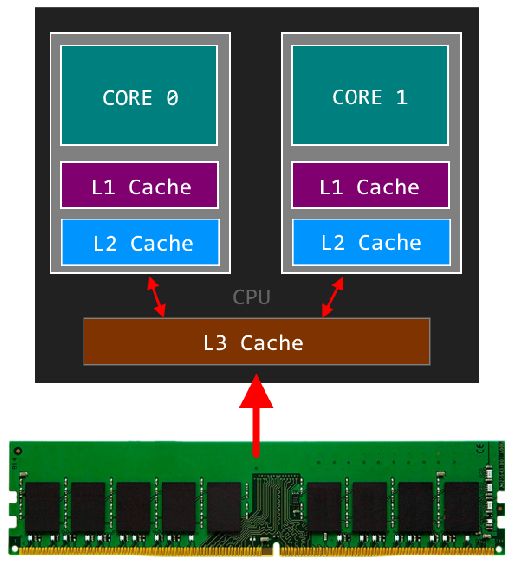
Below are rough approximations for access latencies for the various caches.
| loc | cache | type | cycles | time |
|---|---|---|---|---|
| local | L1 CACHE hit | ~4 | 2.1 - 1.2 ns | |
| local | L2 CACHE hit | ~10 | 5.3 - 3.0 ns | |
| local | L3 CACHE hit | line unshared | ~40 | 21.4 - 12.0 ns |
| local | L3 CACHE hit | shared line in another core | ~65 | 34.8 - 19.5 ns |
| local | L3 CACHE hit | modified in another core | ~75 | 40.2 - 22.5 ns |
| remote | L3 CACHE | ~100-300 | 160.7 - 30.0 ns | |
| local | DRAM | ~60 ns | ||
| remote | DRAM | ~100 ns |
Note: remote refers to memory on a diffrent CPU socket. So remote DRAM is the ram physically connected to the other CPU. See NUMA for more info.
Cache line
The cpu moves data in fixed sized blocks, on x86 cache lines are 64bytes in size to try reduce latency of subsequent memory operations.
This means if you read one byte of data, the cpu actually reads a 64byte block. Similarly if you write one byte 64bytes will end up been flushed to DRAM.
Virtual memory
The x86 micro architecture uses virtual memory to abstract physical memory locations.
Cache lines are based on virtual memory address, every 64 bytes is the start of a new cache line.
This means that you can know where the cache lines begin and end at the application level.
Cache consistency
Modern x86/x64 cpus typically implement the MESI protocol Modified / Exclusive / Shared / Invalid to ensure cache consistency.
When a cache line is loaded by a core it is marked as ‘Exclusive’ which means the core is free to keep reading / writing data from the L1 cache. If another core loads the same cache line it’s marked as ‘Shared’ then if a core writes to that ‘Shared cache lines it’s marked as ‘Modified’ and all other cores are sent a ‘Invalid’ msg for that line. If the core that marked the line as ‘Modified’ sees another core try access the cache line the core writes the line back to memory and marks it as ‘Shared’ the other core incurs a cache miss and must reload the line into its L1 cache.
Observation
So we can see that when multiple threads are accessing data in the same cache line we incur cache misses meaning our memory access time can jump as much as 40x. Which explains why the same code runs much slower when another core is touching memory in the same cache line.
Fixing the code
Lets change the example code so the counters are explicitly placed in different cache lines.
We can do this simply by aligning the struct to 64bytes(the start of a cache line) and making the struct 64bytes in size so the next element in the array is ‘pushed’ onto the next line.
struct Data
{
    int32_t counter = 0;
    uint8_t _pad[60];
};

static_asset(sizeof(Data) == 64, "Struct size don't match cache line size");
alignas(64) Data data[2];

void foo(int32_t idx)
{
    for (int32_t i = 0; i < 1 << 30; i++) {
        ++data[idx].counter;
    }
}

int main()
{
    std::thread t0(foo, 0);
    std::thread t1(foo, 1);

    t0.join();
    t1.join();

    auto sum = data[0].counter + data[1].counter;
    return 0;
}
Execution times
1 Thread(s): 2 sec
2 Thread(s): 2 sec
4 Thread(s): 2 sec
The result is much better scalability across cores.
Another approach
For completeness here is another good approach to solve the problem.
Make use of local variables that will be stored in the threads stack, so no false sharing. Then at the end or periodically write the local variable to the shared state.
This way we limit the amount of cache misses from false sharing, resulting in negligible performance impact.
struct Data
{
    int32_t counter = 0;
};

static_asset(sizeof(Data) < 64, "");
Data data[2];

void foo(int32_t idx)
{
    int32_t localCounter = 0;
    for (int32_t i = 0; i < 1 << 30; i++) {
        ++localCounter;
    }

    data[idx].counter = localCounter
}

int main()
{
    std::thread t0(foo, 0);
    std::thread t1(foo, 1);

    t0.join();
    t1.join();

    auto sum = data[0].counter + data[1].counter;
    return 0;
}
Execution times
1 Thread(s): 2 sec
2 Thread(s): 2 sec
4 Thread(s): 2 sec