3 minutes
Symbol server directory layout
I had the need to store symbol files(.pdb) for a tool I was recently working on, so I thought it would be nice if I could store the symbols exactly the same as a Windows symbol store allowing users to add symbols manually from another symbol store or leverage the Debugging tools for windows like SymStore.exe to add symbols from a CI server.
I also wanted to not rely on any Win32 tools or libs as the tool is cross platform and maybe be running on a Unix machine, but allow ingesting PDB files from a Windows machine via network share or other means.
Example Dir Tree
.
├──Example.pdb
|  └──19152947698946EFACC5E1613B75AE171
|     └── Example2.pdb
|
├──Example2.pdb
   ├──11532B1EA42648829C8B2BA7FE6062959
   |  └── Example2.pdb
   └──330E4CC5581943DFBAF8F3D794CB73351
      └── Example2.pdb
The paths are actually quite simple to build but the format is not immediately obvious and documentation is poor. So I thought I would document how to build them.
Note: Symbol servers can optionally store PDB files with compression, if a PDB is compressed it will have a trailing underscore so they will be transparently ignored and not break anything.
First lets explore how PE and PDB files are linked as this info is used to build the paths in the symbol server.
Matching PDB with PE
When the compiler builds a PE and PDB it generates a Unique ID which is placed in both files.
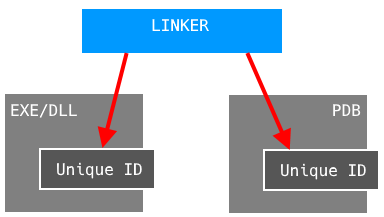
PDB Version 7 contains a GUID and a age value which incremented every time the PDB is patched.
struct CV_INFO_PDB70
{
  DWORD     signature; //  “RSDS”
  GUID      guid;
  DWORD     age;
  BYTE      pdbFileName[];
};
PDB Version 2 contains a unix timestamp and a age value.
struct CV_HEADER
{
  DWORD signature; //  “NB10”
  DWORD offset;
};

struct CV_INFO_PDB20
{
  CV_HEADER cvHeader;
  DWORD     timeStamp;
  DWORD     age;
  BYTE      pdbFileName[];
};
We can extract this Unique ID info in order to find the correct PDB for a given PE.
Building the Paths
Since you could have potentially 1000’s of PDB’s for a given DLL Eg kernel32.dll the symbol server organises files so they can be found in O(1) instead of extracting the UniqueID from every kernel32.dll PDB until we find a match O(N).
The format is as follows.
Folder = \FileName.pdb\GUID + age\FileName.pdb
With this we can just check if the file exists since its UniqueID is part of the path.
The GUID and age are converted to hex representation.
Here is how you format the data in C.
struct GUID
{
    uint32_t data1;
    uint16_t data2;
    uint16_t data3;
    uint8_t data4[8];
};

GUID g;
uint32_t age;

char buf[0x40];
sprintf(buf, "%.8X%.4X%.4X%.2hhX%.2hhX%.2hhX%.2hhX%.2hhX%.2hhX%.2hhX%.2hhX%X",
    g.data1,
    g.data2,
    g.data3,
    g.data4[0], g.data4[1], g.data4[2], g.data4[3],
    g.data4[4], g.data4[5], g.data4[6], g.data4[7],
    age
);
Using this logic we store and load PDB files from a symbol server directory.